

If you’re unable to use your Spectrasonics instruments within your DAW, but the standalone works, then this article may help. You may need to configure some Security and Privacy settings to allow your DAW to access files on your external drive.
OSX Catalina introduced many new security and privacy settings, one of which is that you’ll now need to give your DAWs permission to access files on your removable volume (a.k.a. external hard drive).
For example, when you installed or updated your DAW on Catalina, you may have received a message like this:

If you select “Don’t Allow”, your DAW will not be able to connect to your external drive. This will cause issues with your Spectrasonics instruments if you’ve installed the STEAM or SAGE folder to the external drive.
To change that setting, navigate here:
System Preferences -> Security & Privacy -> Files and Folder
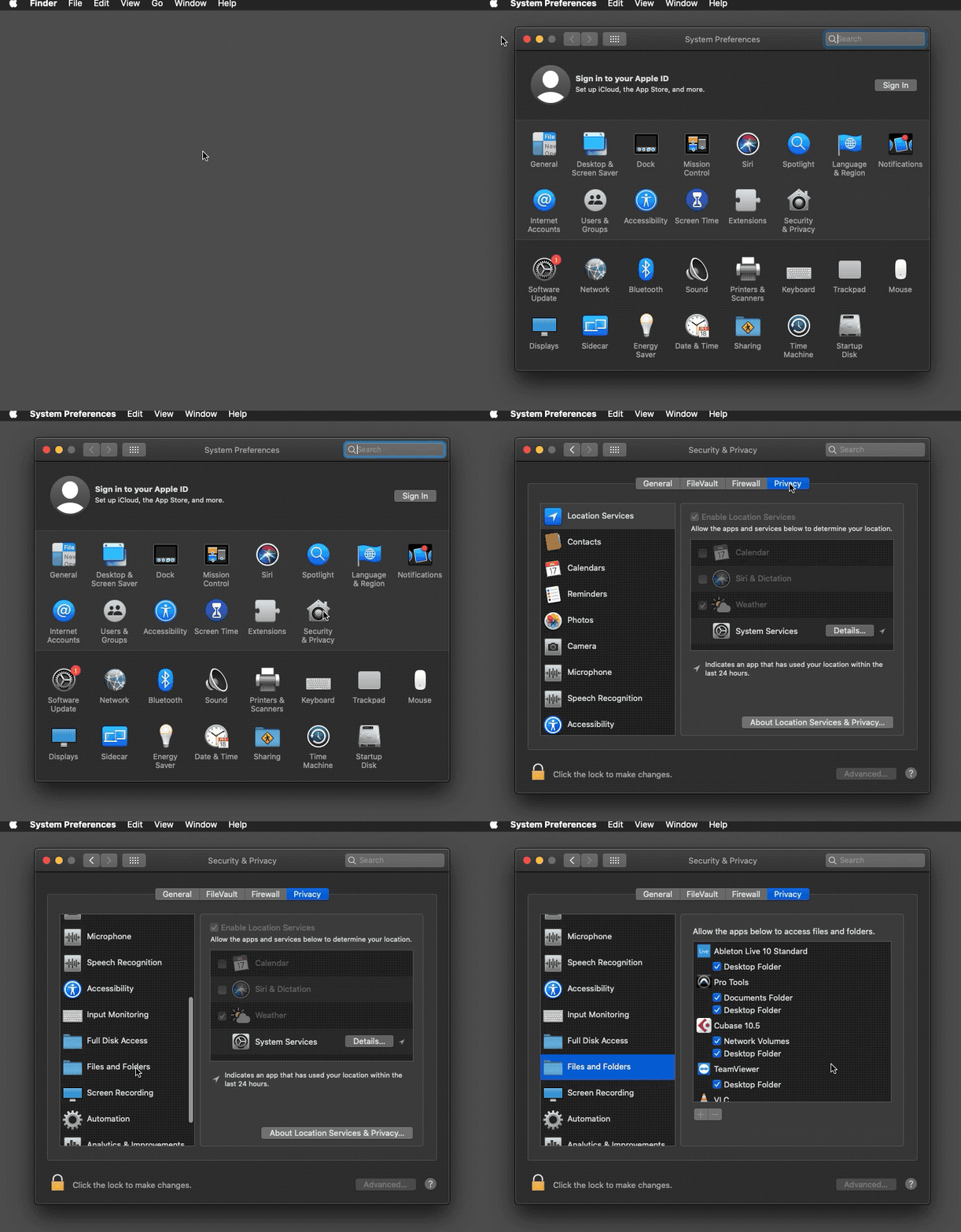
There should be an entry for your DAW with a “Removable Volumes” checkbox on that preferences page that looks like this:

After allowing the DAW to access Removable Volumes, restart the application and try using your Spectrasonics instruments in your DAW again.
If that doesn’t work, please contact tech support at info@spectrasonics.net for additional help.